NeversKey
How it works
NeversKey restores administrative access to Windows machines when Entra ID is compromised or unavailable. It relies only on components already shipped with Windows: PKU2U and its built-in local identity provider, reached through Remote Desktop.
A customer-owned offline root is prepared in peacetime. During a crisis it issues a certificate valid a few hours, for a local break-glass account, and the administrator connects with mstsc /restrictedadmin.
Goals and non-goals
- Regain interactive (Remote Desktop) administrator access to Entra joined or workgroup machines with no dependency on Entra ID, Intune, Active Directory or any network service.
- Keep the trust anchor offline, recoverable from a printed QR code or Shamir shares.
- Deployment and audit that work with Intune, a GPO or a plain PowerShell script.
Not in scope: replacing an enterprise PKI or Windows Hello for Business; machines that were wiped or whose NeversKey settings the attacker removed (the audit detects it, it cannot prevent it); the console logon.
The Windows mechanism: PKU2U and Local Cert Issuer
Windows has a built-in local identity provider for PKU2U, whose trusted roots are a machine certificate store, Local Cert Issuer, empty by default. A PKU2U logon is accepted when:
- the certificate of the client chains to a root in the
Local Cert Issuerstore of the target, and its common name is an existing, enabled local account of the target; - the target presents a certificate of its own, whose chain ends in its own
Local Cert Issuerand in the one of the workstation; - the local identity provider is enabled and PKU2U online identities are allowed on both sides.
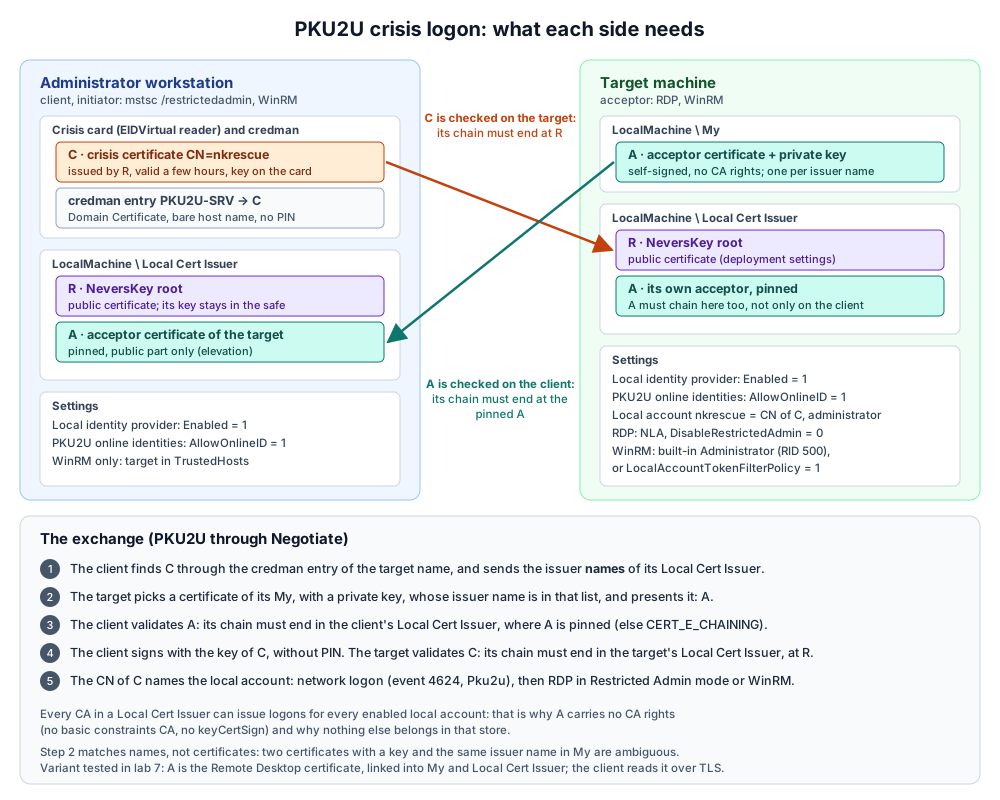
What follows from it:
- The root goes into
Local Cert Issuer, not into the trusted roots: it is trusted only by the local identity provider, not for TLS or code signing. - Every CA in
Local Cert Issuercan issue logons for every enabled local account. Nothing else may go there: the audit treats any extra certificate as a finding. - Every machine needs a certificate of its own. NeversKey makes it self-signed, without CA rights, and pins it in the machine's
Local Cert Issuer: a pinned certificate without CA rights cannot issue logons. The root never comes out for it, and there is no machine list to keep: the workstation reads that certificate from the machine the first time it connects, as an SSH client learns a host key, and the administrator compares its thumbprint with the audit report. - Every machine needs an enabled local account named as the crisis certificates: the built-in Administrator managed by Windows LAPS, or a dedicated account. Nobody needs to know its password.
- Remote Desktop in Restricted Admin mode reuses the PKU2U network logon: no password is delegated to the machine.
Lifecycle
- Init, offline ceremony: the root key is generated in memory and printed. The printed page alone restores the key and its certificate; the key is wiped from memory afterwards.
- Deploy: the settings (root in
Local Cert Issuer, local identity provider, PKU2U online identities, Restricted Admin) and the machine certificate, by a script run once as SYSTEM, or a.regfor a GPO. Public data only. - Audit, periodic: a read-only script on each machine, an HTML report of the machines that cannot be recovered and of any unexpected certificate.
- Crisis: the vault issues a NeversKey valid a few hours; the administrator adds the machine and connects.
- End of the crisis: the NeversKey is deleted and the changes of the workstation undone.
Threat model
The root key opens every enrolled machine: NeversKey is a deliberate, controlled back door. Its security is the protection of that key and the visibility of its use.
| Threat | Mitigation |
|---|---|
| Theft of the root key backup | Encrypted with a passphrase, optional Shamir split among k of n custodians, generated and used on an offline machine only. |
| An attacker who controls Entra ID or Intune removes the NeversKey settings | Cannot be prevented by design; the audit reports it. Deploy through a channel independent from Intune where possible. |
| Theft of a crisis USB key | Valid a few hours (8 by default, 72 at most), key generated on the card. PKU2U has no PIN, so the key is a bearer token for that time, to be kept like a key to the server room. Emergency stop: disable the break-glass account. |
| Substitution of the request or the response | The request code read out by phone is the fingerprint of the request; the response opens only on the requesting workstation and account, once. |
| Misuse by an insider | Ceremonies need the passphrase or k custodians; every issuance is logged; every logon is a 4624 event (package Pku2u) for the SIEM. |
A rogue CA added to Local Cert Issuer | The audit compares both physical stores with the expected thumbprints and flags any extra certificate. |
| Theft of the key of a machine certificate | It has no CA rights and cannot issue logons; it only lets its holder impersonate that machine, and that holder is SYSTEM there anyway. |
No revocation server
The certificates carry no CRL or OCSP address: an unreachable one would make the logon fail during the crisis, exactly when the network may be isolated, and a CRL would bring the offline root online regularly. Revocation is replaced by a short validity for the crisis certificates and by the renewal of the machine certificates. NeversKey never contacts a vendor service.
Supported Windows versions
The crisis connection works from a Windows 11 administrator workstation to Entra joined Windows 10, Windows 11, Windows Server 2019, 2022 and 2025 machines; the machine stays Entra joined. Windows Server 2016 is not supported.
Background: PKU2U peer-to-peer authentication internals and RDP / mstsc PKU2U prerequisites.